

This calculator shows the gap between two numbers as a percentage. The calculator first finds the difference between the two numbers. It then divides that difference by the average of the two numbers and multiplies by 100 to show the result as a percentage. Neither number is treated as the original or reference value, so the order does not matter.
How to Use the Percentage Difference Calculator
- Enter the first number in the Value 1 box and the second number in the Value 2 box.
- Choose how many decimal places you want in the result, from 0 to 6. The default is 2.
A few useful things to know:
- You can type numbers with commas, spaces, or a ‘$’ sign, such as 2,684 or $84. The calculator ignores those characters.
- You can also enter negative numbers, such as -3.5.
What You Will See in the Result:
- Percentage difference
- Step by step working
- Absolute difference |V1 − V2|
- Average of the two values
- Change from V1 to V2 (increase or decrease)
- Change from V2 to V1 (increase or decrease)
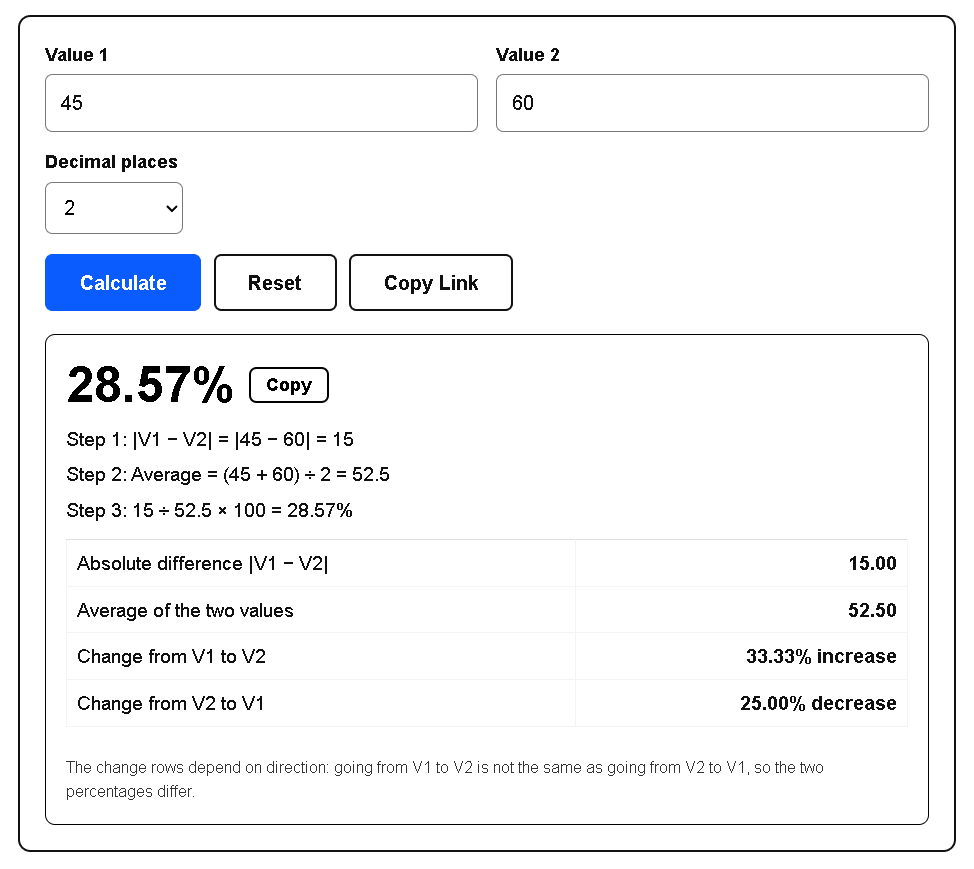
Example: Two phone plans cost $45 and $60 per month. Enter 45 in Value 1 and 60 in Value 2.
Difference = |45 − 60| = 15
Average = (45 + 60) ÷ 2 = 52.5
15 ÷ 52.5 × 100 ≈ 28.57%
Going from 45 to 60 is a 33.33% increase, and going from 60 to 45 is a 25.00% decrease.
What Is Percentage Difference?
Percent means ‘out of 100’. A percentage is one way to show how two numbers relate. Ratios, fractions, and decimals can show the same relationship. For example, 62% = 0.62 = 62/100.
Use percentage difference when you want to know how far apart two values are, relative to their average.
Both numbers should measure the same kind of thing in the same unit, such as the prices of one item at two stores or the test scores of two students. Comparing a store’s price with a student’s score has no meaning.
To find a percentage difference, you need two different numbers, such as 55 and 75. Their difference is 20.
To turn that 20 into a percentage, you need a reference point, called the base. Which should be the base, 55 or 75? Neither is the original value, so the fairest choice is the average of the two numbers. Here the average is 65, and 20 ÷ 65 × 100 ≈ 30.77%.
Why Do We Use the Average as the Base?
Suppose the numbers are 30 and 50, so the difference is 20.
With 30 as the base: 20 ÷ 30 = 66.67%.
With 50 as the base: 20 ÷ 50 = 40%.
With the average (40) as the base: 20 ÷ 40 = 50%.
The first two answers are very different, and neither is more correct than the other. Someone else could pick the other number as the base and get a different answer. Using the average removes that confusion.
That is why percentage difference is a non-directional comparison. It does not say that a value increased or decreased.
Percentage Difference Formula
Percentage Difference = |V1 − V2| ÷ ((V1 + V2) ÷ 2) × 100
V1 and V2: are the two values which you have to compare.
(V1 + V2) ÷ 2 is the average of the two values.
| | means absolute value. It removes the negative sign, for example |−8| = 8.
We use the absolute value because both numbers are equally important, so the difference has no direction. The minus sign is simply dropped.
If both numbers are negative, the average is negative too, so the calculator divides by the absolute value of the average. This keeps the result positive.
How to Calculate Percentage Difference Step by Step
Step 1: Find the difference. Subtract one number from the other. If the answer is negative, drop the minus sign.
Step 2: Find the average. Add both numbers and divide the sum by 2.
Step 3: Divide the difference by the average.
Step 4: Convert to a percentage. Multiply the result by 100 and add the % sign.
To convert a decimal like 0.32 to a percent, use our decimal to percent calculator.
Example: Gas Prices (With Decimals)
Gas costs $3.20 per gallon in one city and $3.80 in another.
Step 1: |3.20 − 3.80| = 0.60
Step 2: (3.20 + 3.80) ÷ 2 = 3.50
Step 3: 0.60 ÷ 3.50 = 0.1714…
Step 4: 0.1714… × 100 ≈ 17.14% (rounded to two decimal places)
To divide by hand, try our long division calculator with decimals.
Does the Order of the Numbers Matter?
Percentage difference is a “difference” not a “change”.
Example: 36 and 44.
|36 − 44| ÷ ((36 + 44) ÷ 2) × 100 = 8 ÷ 40 × 100 = 20%
Now swap the numbers: |44 − 36| ÷ ((44 + 36) ÷ 2) × 100 = 8 ÷ 40 × 100 = 20%
Both answers are the same because the absolute value removes the minus sign, and the average stays the same when the numbers swap places.
Percentage Difference vs Percentage Change
If you want to know how much a value has changed from an old value to a new value, you need percentage change, not percentage difference.
Percentage difference and percentage change both compare two numbers, but they answer different questions. Percentage difference shows how far apart two values are, using their average as the base, so the order does not matter. Percentage change shows how much a starting value has grown or shrunk, so one value is the base and the direction matters.
Take 45 and 60. Their percentage difference is 28.57% in either order. The percentage change is a 33.33% increase from 45 to 60, but a 25.00% decrease from 60 to 45.
Notice that both of these percent changes differ from 28.57%. In a percent change, one value is the base. In a percentage difference, the average of the two values is the base.
| Measure | Base | Direction matters? | Use it when |
|---|---|---|---|
| Percentage difference | Average of the two values | No | Neither value is the original or the standard |
| Percentage change | The starting value | Yes | You have a before-and-after situation |
| Percent error | The accepted value | No | You compare a measurement with a known value |
For a percentage increase or decrease of a single number, use our percentage calculator.
When to Use Percentage Difference (and When Not To)
When to use:
- When both values measure the same kind of thing, such as the heights of two people or the prices at two stores.
- When neither value is the ‘original’ or the standard.
- When you are comparing two independent measurements or observations, such as two lab readings, two vendor quotes, or the results of two A/B test versions.
When not to use:
- When you have an old (starting) value and a new value, use percentage change.
- If one value is a measured result and the other is a known or accepted value, use percent error.
- When you are comparing the same thing at two points in time, such as this year’s rent and last year’s rent, use percentage change.
Real-Life Uses of Percentage Difference
- Lab science: comparing two independent measurements of the same quantity.
- Quality control: checking how consistent two production batches or two machines are.
- Market research: comparing two survey results or two price quotes.
- Sports analytics: comparing two players or two teams when neither is the baseline.
Special Cases in the Calculator
- Equal values (such as 36 and 36): The result is 0%, and both change rows show “0% (no change)”.
- One value is 0 (such as 0 and 40): The percentage difference is 200%. The change from 0 shows “undefined”, because a percent change cannot be calculated from a starting value of 0.
- Exact opposites (such as 7 and −7): The result is “Undefined”, because the average is 0 and the formula would divide by zero.
- One positive and one negative value (such as 8 and −2): The calculator returns 333.33% and shows a note. The average is close to zero, so the percentage can be very large.
- Two negative values (such as −10 and −30): The result is 100%. The calculator divides by the absolute value of the average, so the result is never negative.
- Negative starting value in the change rows: The calculator divides by the absolute value of the starting number, so “increase” always means the value went up. For example, −10 to −5 is a 50.00% increase.
FAQs
1. How do I calculate percentage difference in Excel or Google Sheets?
Use =ABS(A1-B1)/ABS(AVERAGE(A1,B1)) and format the cell as a percentage. With 45 in A1 and 60 in B1, it returns 0.2857, shown as 28.57%. The ABS around AVERAGE keeps the result positive when both values are negative. If the two values are exact opposites, the sheet shows #DIV/0!, just as this calculator shows “Undefined”.
2. Can percentage difference be negative?
No. The formula uses the absolute value of the difference in the numerator, so the result is never negative. A result of 0% means the two values are identical. If the two values are exact opposites, such as 7 and −7, the percentage difference is undefined.
3. Can percentage difference be more than 100%?
Yes. Between two positive numbers it can get close to 200% but never reach it (1 and 1,000 give about 199.6%). If one value is 0, it is exactly 200%. With one positive and one negative number it can go higher (8 and −2 give 333.33%).
4. Why does the calculator show “Undefined”?
It happens when the two values are exact opposites, such as 7 and −7. Their average is 0, and the formula divides by the average, so the result cannot be calculated. Check your numbers, or use the change rows if one value is clearly the starting point.
5. Can I find the percentage difference between two percentages?
Yes. Enter them as plain numbers. For 12% and 8%, enter 12 and 8, and the calculator returns a 40% percentage difference. That is different from the 4 percentage points you get by subtracting 8 from 12. Percentage points describe the plain gap between two percentages, while percentage difference describes the gap relative to their average. Say which one you mean when you report a result. To average several percentages instead, use the average percentage calculator.
6. What is a good percentage difference?
There is no single cutoff, because it depends on what you compare. In a lab, the acceptable range depends on the experiment and your instructor, so check your lab manual. For prices or quotes, a 10% gap can be small on a $20 item and large on a big contract.
7. What is the difference between percentage difference and percent error?
Percentage difference compares two values that have equal standing and uses their average as the base. Percent error compares a measured value with a known or accepted value, using the accepted value as the base: |measured − accepted| ÷ |accepted| × 100. If you measure gravity as 9.65 m/s² and the accepted value is 9.80 m/s², the percent error is 1.53%.
8. When is percentage difference exactly 100%?
When one number is exactly three times the other, such as 18 and 54. For positive numbers, if the percentage difference is 100%, then |a − b| = (a + b) ÷ 2. Suppose a ≥ b (the order does not change the answer). Now we can drop the absolute value: a − b = (a + b) ÷ 2. Multiply both sides by 2: 2a − 2b = a + b. Simplify: a = 3b.
Example: 18 and 54. Here 54 = 3 × 18. Difference = 36, average = (18 + 54) ÷ 2 = 36, and 36 ÷ 36 × 100 = 100%.
Last reviewed: October 5, 2026. by the VersaCalculator team.
Sources
- Wikipedia, “Relative change”: https://en.wikipedia.org/wiki/Relative_change
- Clemson University Physics Lab Tutorials, “% Error & % Difference”: https://science.clemson.edu/physics/labs/tutorials/error/index.html
- SUNY Geneseo, Technical Report Writing Guidelines, Appendix C: https://milnepublishing.geneseo.edu/technicalreportwritingguidelines/back-matter/appendix-c-writing-tips-for-discussing-results/
- U.S. Bureau of Labor Statistics, Handbook of Methods, “Index Numbers”: https://www.bls.gov/opub/hom/topic/index-number-formulae.htm
- U.S. Bureau of Labor Statistics, Employment Projections concepts: https://www.bls.gov/emp/factsheets/concepts.htm
Gouse Shah is the Chief Editor of VersaCalculator.com, a software engineer with over seven years of industry experience, and a dedicated student of mathematics. Based in Bengaluru, India, he leads a team of educators who research, code, test, review, and publish each calculator so users get accurate, easy-to-understand answers. He follows a standard quality-check process on all content before it is published.