
Equal Spacing Calculator
Professional spacing calculator for balusters, spindles, pickets, shelves, slats, fasteners, and more. Generate multiple spacing options with detailed measurements and visual diagrams.
Calculator Inputs
Spacing Options & Results
Ready to Generate
Enter your measurements and click “Generate Spacing Options” to see multiple spacing configurations.
Did this tool save you time? Support our team’s work with a small tip (even $5 helps!):

What is the Equal Spacing Calculator?
The Equal Spacing Calculator is a sophisticated digital tool designed to calculate precise, evenly distributed measurements for various architectural and woodworking elements. This professional calculator eliminates guesswork and mathematical errors when determining optimal spacing for balusters, spindles, pickets, shelves, slats, fasteners, and other dividers.
Whether you’re building deck railings, installing shelving, creating fencing, or working on any project requiring evenly spaced elements, this calculator generates multiple spacing options with detailed measurements and visual diagrams to ensure perfect results every time.
Unlike basic calculators, this tool provides multiple spacing configurations based on your input parameters, allowing you to choose the option that best fits your project requirements and aesthetic preferences. It accommodates both imperial (feet/inches) and metric measurements, making it suitable for users worldwide while particularly addressing U.S. building code requirements, including the crucial 4-inch maximum spacing rule for balusters mandated by U.S. building codes.
How to Use the Equal Spacing Calculator
Step 1: Select Your Measurement System
- • Choose between Imperial (feet and inches) or Metric (millimeters, centimeters, meters) based on your preference and project requirements.
Step 2: Input Your Space Measurements
- • For Imperial users: Enter the total space width in feet, inches, and fractions of an inch. For example, a 4-foot space with 3 ½ inches would be entered as 4 feet, 3 inches, and 1/2 fraction.
- • For Metric users: Enter the total space width in your preferred unit (mm, cm, m). The calculator will maintain consistency throughout.
Step 3: Enter Divider Width
- • Specify the width of each divider element. For balusters or spindles, this is their thickness. For fastener spacing, this value would be zero.
Step 4: Set Maximum Dividers
- • Determine the maximum number of dividers you’re willing to use. The calculator will generate all possible options from 2 dividers up to this maximum.
Step 5: Generate Results
- • Click “Generate Spacing Options” to compute all possible configurations. Select from the dropdown menu to view detailed measurements, visual diagrams, and placement guidelines for each option.
Step 6: Interpret Results
- • Review the space width (gap between dividers), on-center spacing (distance from the center of one divider to the next), and total dividers for each configuration.
- • Examine the visual diagram showing the spacing arrangement and the measurement table with precise positioning for each divider.
Table: Input Parameters Overview
| Parameter | Description | Example Values |
|---|---|---|
| Space Width | Total distance to be filled | 48 inches, 1200 mm |
| Divider Width | Width of each individual divider | 1.75 inches, 44 mm |
| Maximum Dividers | Highest number of dividers to consider | 15 |
| Measurement System | Units of measurement | Imperial or Metric |
How the Calculator Works
Core Calculation Formula
The primary formula used for equal spacing calculation is:
Space Size = (Total Space Width – (Number of Dividers × Divider Width)) / (Number of Dividers + 1)
This formula calculates the gap size between dividers while accounting for the space occupied by the dividers themselves.
On-Center Spacing Formula
For installation purposes, the calculator also computes on-center measurements:
On-Center Spacing = Space Size + Divider Width
This measurement is crucial for marking divider positions during installation.
Calculation Example
Let’s consider a practical example with imperial measurements:
- • Total space width: 48 inches (4 feet)
- • Divider width: 1.75 inches
- • Number of dividers: 8
- 1. Total divider width: 8 × 1.75 = 14 inches
- 2. Remaining space: 48 – 14 = 34 inches
- 3. Number of gaps: 8 + 1 = 9
- 4. Space size: 34 ÷ 9 = 3.78 inches (~3 ¾”)
- 5. On-center spacing: 3.78 + 1.75 = 5.53 inches (~5 ½”)
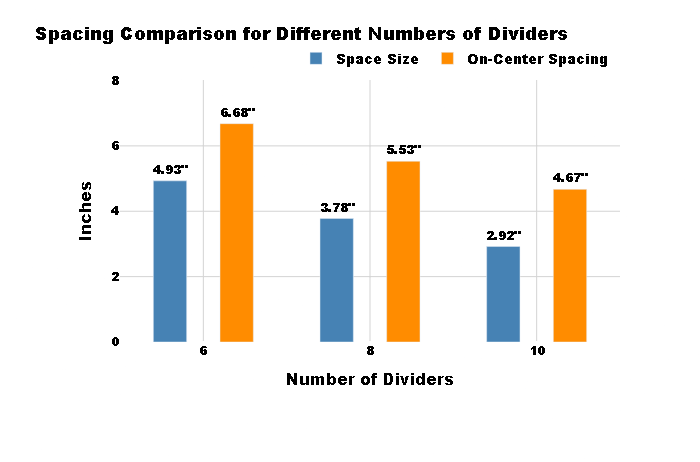
Table: Calculation Results for Different Divider Quantities
| Number of Dividers | Space Size | On-Center Spacing | Total Space Used |
|---|---|---|---|
| 6 | 4.93 inches | 6.68 inches | 45.14 inches |
| 8 | 3.78 inches | 5.53 inches | 47.02 inches |
| 10 | 2.92 inches | 4.67 inches | 48.00 inches |
Understanding Spacing Concepts: Visual Diagrams and Measurement Tables
Visual Diagrams
- • The color-coded diagram shows dividers and spaces scaled to represent your specific configuration
- • Space labels indicate the exact measurement between dividers
- • Divider numbers help identify individual elements in the sequence
- • The diagram adjusts to display a representative sample when space constraints limit showing all dividers.
Measurement Tables
- • Position: Each divider location from start to finish
- • Near side: Measurement from the starting point to the nearest side of each divider
- • On-center: Measurement from the starting point to the center of each divider
- • Far side: Measurement from the starting point to the far side of each divider
This detailed positioning data ensures precise installation without cumulative measurement errors.
Practical Applications and Building Code Compliance
Deck Balusters and Railing Spindles
- • Ensure compliance with the 4-inch maximum spacing rule required by U.S. building codes
- • Prevent small children from getting stuck between balusters while maintaining aesthetic appeal
- • Calculate both straight and stair railing configurations.
Shelving and Storage Solutions
- • Space shelves evenly for optimal storage capacity and visual balance
- • Determine divider placement for customized organizational systems
Fencing and Picket Installation
- • Space pickets evenly along fence lines, especially between posts
- • Adjust for angled sections and gate openings
Architectural Details
- • Space brick ties, fasteners, and structural elements
- • Plan board-and-batten siding patterns
- • Layout rebar or structural supports in concrete.
Table: Building Code Requirements for Different Applications
| Application | Maximum Space Allowed | Code Reference | Safety Consideration |
|---|---|---|---|
| Deck Balusters | 4 inches | International Residential Code | Prevent child passage |
| Guardrails | 4 inches | International Residential Code | Fall protection |
| Stair Balusters | 4 inches | International Residential Code | Head entrapment prevention |
Centered vs. Even Spacing Options
The calculator offers two approaches to spacing:
- 1. Centered Spacing: Balances end spaces for symmetrical appearance.
- 2. Even Spacing: Maintains consistent gaps throughout, potentially resulting in different end spaces.
Handling Angles and Sloped Surfaces
For stair railings and sloped applications:
- • The calculator adjusts for angle measurements
- • Provides horizontal and slanted spacing values
- • Maintains code compliance even on inclined surfaces.
Measurement Conversion
- • Seamlessly switch between imperial and metric systems
- • View results in inches only or feet and inches
- • Eliminate conversion errors with automatic calculations.
Pro Tips for Best Results
- 1. Always verify local building codes before finalizing your design
- 2. Use the smallest divider width measurement for irregularly shaped elements
- 3. Consider purchasing 1-2 extra dividers to account for cutting errors
- 4. For critical applications, physically test the spacing before final installation
- 5. Print the diagram and measurement table for reference during installation.